| この記事の要点 |
|
Actionは要求処理の入口です。業務処理と画面遷移を分けて読み、ActionForm・mapping・JSPまで一組で確認します。Struts 1は保守終了済みで、本記事の旧コードは既存システムの理解と移行のための参考です。
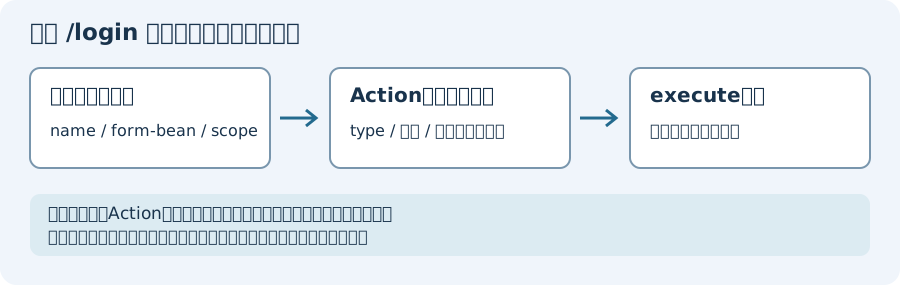
Struts 1 Action の基本形
次は構造を示す断片です。LoginForm・UserService・User・メッセージ定義・imports等は別に必要です。認証後のセッション管理やCSRF対策、認可を省略しており、安全なログイン実装として丸ごとコピーしないでください。
public class LoginAction extends Action {

    @Override
    public ActionForward execute(
            ActionMapping mapping,
            ActionForm form,
            HttpServletRequest request,
            HttpServletResponse response) throws Exception {

        // 1. ActionForm をキャスト
        LoginForm loginForm = (LoginForm) form;
        String userId = loginForm.getUserId();
        String pass   = loginForm.getPassword();

        // 2. 業務ロジック
        UserService svc = new UserService();
        User user = svc.authenticate(userId, pass);

        if (user == null) {
            ActionMessages errors = new ActionMessages();
            errors.add("login", new ActionMessage("error.login.failed"));
            saveErrors(request, errors);
            return mapping.findForward("failure");
        }

        // 3. セッション格納
        request.getSession().setAttribute("loginUser", user);

        // 4. 遷移先を返す
        return mapping.findForward("success");
    }
}
struts-config.xml の設定
<?xml version="1.0" encoding="UTF-8"?>
<struts-config>

    <!-- form bean 定義 -->
    <form-beans>
        <form-bean name="loginForm" type="com.example.LoginForm"/>
    </form-beans>

    <!-- action 定義 -->
    <action-mappings>
        <action path="/login"
                type="com.example.LoginAction"
                name="loginForm"
                scope="request"
                validate="true"
                input="/WEB-INF/jsp/login.jsp">
            <forward name="success" path="/WEB-INF/jsp/home.jsp"/>
            <forward name="failure" path="/WEB-INF/jsp/login.jsp"/>
        </action>
    </action-mappings>

</struts-config>
ActionForm
この例のvalidateは入力形式の検査で、本人確認ではありません。登録済み利用者の認証方針とパスワード長を勝手に置き換えないでください。またrequest/sessionスコープによってフォームの保持範囲が変わります。Actionのインスタンスの共有とフォームのスコープは別です。
public class LoginForm extends ActionForm {
    private String userId;
    private String password;

    public String getUserId() { return userId; }
    public void setUserId(String v) { this.userId = v; }
    public String getPassword() { return password; }
    public void setPassword(String v) { this.password = v; }

    @Override
    public ActionErrors validate(ActionMapping mapping, HttpServletRequest req) {
        ActionErrors errors = new ActionErrors();
        if (userId == null || userId.isEmpty()) {
            errors.add("userId", new ActionMessage("error.required.userid"));
        }
        if (password == null || password.length() < 8) {
            errors.add("password", new ActionMessage("error.password.length"));
        }
        return errors;
    }

    @Override
    public void reset(ActionMapping mapping, HttpServletRequest req) {
        this.userId = null;
        this.password = null;
    }
}
JSP 側
<%@ taglib uri="http://struts.apache.org/tags-html" prefix="html" %>
<%@ taglib uri="http://struts.apache.org/tags-bean" prefix="bean" %>

<html:form action="/login">
    ユーザーID: <html:text property="userId"/><br/>
    <html:errors property="userId"/><br/>

    パスワード: <html:password property="password"/><br/>
    <html:errors property="password"/><br/>

    <html:submit value="ログイン"/>
</html:form>
DispatchAction(1 Action 複数メソッド)
methodで処理を選べても、認可が付くわけではありません。下のshow例ではidの未指定・非数値・対象不在を処理する必要があります。delete等の更新処理では、許可するHTTPメソッド・CSRF検証・対象ごとの操作権限を別途確認し、URLのパラメータだけで削除を許可しないでください。下のコードのdeleteは処理を省略した断片です。
機能ごとに Action クラスを作ると膨大になるため、DispatchAction で 1 クラスに複数機能を集約:
public class UserAction extends DispatchAction {

    public ActionForward list(ActionMapping mapping, ActionForm form,
            HttpServletRequest req, HttpServletResponse res) throws Exception {
        req.setAttribute("users", new UserService().findAll());
        return mapping.findForward("list");
    }

    public ActionForward show(ActionMapping mapping, ActionForm form,
            HttpServletRequest req, HttpServletResponse res) throws Exception {
        long id = Long.parseLong(req.getParameter("id"));
        req.setAttribute("user", new UserService().findById(id));
        return mapping.findForward("detail");
    }

    public ActionForward delete(ActionMapping mapping, ActionForm form,
            HttpServletRequest req, HttpServletResponse res) throws Exception {
        // ...
        return mapping.findForward("list");
    }
}
<!-- struts-config.xml: parameter で method を切り替え -->
<action path="/user"
type="com.example.UserAction"
parameter="method"
scope="request">
<forward name="list" path="/WEB-INF/jsp/user/list.jsp"/>
<forward name="detail" path="/WEB-INF/jsp/user/detail.jsp"/>
</action>
<!-- 呼び出し: /user.do?method=list / /user.do?method=show&id=1 -->Action Chain (forward の連鎖)
1 Action の結果を別の Action に流す:
<action path="/login" type="com.example.LoginAction">
    <!-- 成功時に /home に forward (chain) -->
    <forward name="success" path="/home.do" redirect="false"/>
</action>

<action path="/home" type="com.example.HomeAction">
    <forward name="default" path="/WEB-INF/jsp/home.jsp"/>
</action>注意: Action Chain は Struts 1.x で多用されたが、デバッグが困難でアンチパターン扱い。共通業務処理はサービス層 (Service)への分離を検討します。forwardとredirectでは要求属性の保持が異なるため、既存の遷移を削除・置換する前に入力エラー時と成功時の動作を照合してください。
Spring MVC への移行
Struts 1 は 2013 年 4 月にサポート終了。セキュリティ保守のない状態を放置せず、保守される環境への移行を計画してください。ただし移行先がSpring MVCに限られるわけではなく、Apacheも置き換えるだけの互換製品はないと案内しています。以下はSpring MVCを選んだ場合の構造比較です:
// Struts 1 → Spring MVC
@Controller
@RequestMapping("/user")
public class UserController {

    @Autowired
    private UserService userService;  // DI で注入

    @GetMapping
    public String list(Model model) {
        model.addAttribute("users", userService.findAll());
        return "user/list";   // → /WEB-INF/jsp/user/list.jsp
    }

    @GetMapping("/{id}")
    public String show(@PathVariable Long id, Model model) {
        model.addAttribute("user", userService.findById(id));
        return "user/detail";
    }

    @PostMapping("/save")
    public String save(@Valid @ModelAttribute UserForm form,
                       BindingResult result,
                       RedirectAttributes ra) {
        if (result.hasErrors()) return "user/edit";
        userService.save(form);
        ra.addFlashAttribute("msg", "保存しました");
        return "redirect:/user";
    }
}
Struts 1 vs Spring MVC
比較は概念の違いです。Springのサポート状況や必要なServlet/Java/名前空間は使用する版で確認します。上のController断片のuser/listという戻り値からJSPパスへの解決にはViewResolver等の設定が必要で、コメントだけでそのパスになるわけではありません。UserFormの制約・検証依存・サービス・認証設定も別です。
| 項目 | Struts 1 | Spring MVC |
|---|---|---|
| サポート | 2013/04 EOL | 継続中 |
| 設定 | struts-config.xml | アノテーション |
| Form | ActionForm (継承必須) | POJO + @ModelAttribute |
| DI | 標準Action生成は直接生成。旧Spring連携等は別設定・版の確認が必要 | 標準搭載 |
| REST | 独自に応答は作れるが、現代的なREST用アノテーションの構造とは異なる | @RestController で標準対応 |
| テスト | Action等の単体はServletのモックで検査可能。JSP・配備全体は統合検査が別途必要 | MockMvc で容易 |
段階的移行: DelegatingActionProxy
下の例は古い連携設定の読解用で、新しい移行計画の標準手順ではありません。 Spring 3.2.18のDelegatingActionProxyはSpring 3.0以降非推奨です。現行Springへこのクラス名を足すだけでは連携できません。実際のライブラリの版・クラスの有無・WebApplicationContextとContextLoaderPlugInの設定を確認してください。
下のBeanにはuserServiceのsetterが必要ですが、上のLoginAction断片にはありません。二つの例をそのまま結合しても動く完成例ではありません。委譲先のBean名はpathとモジュールprefixに対応し、/adminモジュールの/loginなら/admin/loginを照合します。プロキシの存在を認証・認可・保守継続の保証と扱わないでください。
<!-- struts-config.xml: Action を DelegatingActionProxy 経由に -->
<action path="/login"
        type="org.springframework.web.struts.DelegatingActionProxy">
    <forward name="success" path="/WEB-INF/jsp/home.jsp"/>
</action>

<!-- applicationContext.xml: Bean として Action を定義 -->
<bean name="/login" class="com.example.LoginAction">
    <property name="userService" ref="userService"/>
</bean>
FAQ
Q: Struts 2 ではどうなる?
A: Struts 2 は別物(旧 WebWork)。Action は POJO で execute() が String を返す形に。Struts 1 とは互換性なし。
Q: 既存の Struts 1 アプリはすぐ捨てるべき?
A: 公開系なら最優先。社内系でも段階的移行を計画。CVE-2014-0114 等の重大脆弱性あり。
Q: ActionServlet は何をしている?
A: Struts 1 の FrontController。web.xml で *.do をマップし、URL から ActionMapping を解決して Action を呼ぶ。Spring MVC では DispatcherServlet がそれに相当。
要求ごとの値をActionのフィールドに置かない
Struts 1.3.10の標準RequestProcessorは、生成したActionをtypeのクラス名で保持し再利用します。同じprocessor内の異なるpathでも同一typeなら同じActionでした。Actionに現在のrequest・form・userIdを保存すると別要求の値を共有し得るため、executeの引数やローカル変数で扱います。独自processorの生成規則やサービス自体のスレッド安全性は別に確認してください。
移行時に比較する動作
- 既存URL・HTTPメソッド・文字コード・パラメータ名。古いURLからの利用を勝手に切らない。
- 入力検証で戻る画面、エラーメッセージ、フォーム値の保持。入力エラーと認証エラーを分ける。
- forward/redirect、要求属性・session属性、認証後とログアウト後の状態。
- 対象データの取得・更新・操作権限。Controllerが応答しただけでDB更新や認可の一致と扱わない。
検証範囲と一次資料
Struts 1.3.10のAction生成、同じtypeの再利用、生成後のexecute失敗はServletコンテナなしの単体で確認しました。これは上のログイン・JSP・Spring移行全体の動作確認ではありません。既存アプリの要求と応答を比較する統合検査が別途必要です。
Apache Struts 1.3.10公式ソース配布、Spring 3.2.18のDelegatingActionProxy API、Struts 1保守終了と移行案内。
子ページはありません
人気ページ
- 1 Eclipseで「サーバーに追加または除去できるリソースがありません。」の原因と対処法
- 2 tomcat の起動 / 停止ログと catalina.log・catalina.out の違い
- 3 JavaScript で base URL を取得する方法|window.location.origin
- 4 YouTube Data API v3 エラー一覧|403・400・404 の原因と対処
- 5 Laravel エラー一覧|500/Blade/DB 接続/ルーティングの代表エラー
- 6 3Dグラフィックスとは|モデリング/レンダリング/主要ソフトウェア (Blender / Maya)
- 7 Spring Frameworkのアノテーション一覧
- 8 【Spring】@Valueアノテーションとは
- 9 CATALINA_HOME の確認方法 (Linux / Mac)
- 10 【Spring】@Autowiredアノテーションとは
最近更新/作成されたページ
- Git pushした変更の取消し|revert・履歴変更と保護の注意点 2026-10-15 23:49:01
- Gitでローカルを戻す前に|reset・restoreの違いと退避範囲 2026-10-15 23:49:01
- Git rebaseの使い方|対象範囲・競合解決・pushの判断 2026-10-15 22:50:59
- Git pullの使い方|取込み先・ff-only・競合とstashの注意点 2026-10-15 22:50:59
- Git pushの使い方|送信先・タグ・force-with-leaseの条件 2026-10-15 22:12:47
- Git remoteの設定・確認・削除|SSH URLとfetch/pushの違い 2026-10-15 22:12:47
- Gitリモートリポジトリの作成|初回push・既存履歴・mirrorの注意 2026-10-15 15:48:16
- Gitのuser.name・user.email設定|local/global・確認と過去履歴の注意 2026-10-15 15:30:07
- LinuxにGitをインストール|配布元・初期設定・TLSと認証の確認 2026-10-15 15:30:06
- Git導入と初回push|Linuxサーバー・Windows/macOS・SSH設定 2026-10-15 14:51:54
- Db2のCREATE INDEX|索引定義・INCLUDEと実行計画の確認 2026-10-15 14:10:22
- Db2の自動採番|IDENTITY・ID取得とRESTARTの注意点 2026-10-15 14:10:22
- 【DB2】特定スキーマの全テーブルの全カラム情報を取得する方法 2026-10-15 13:53:15
- Db2のシーケンスとIDENTITYの違い|採番とカタログの確認SQL 2026-10-15 13:53:15
- Db2で複数カラムをUPDATEする方法|SET・WHEREと更新前の値 2026-10-15 13:53:15