| この記事の要点 |
|
Vue.js でよく遭遇するエラー一覧
Vue 3 を中心に、開発で頻出するエラーと対処をまとめます。多くは Vue 2 にも当てはまります。
この一覧には失敗例と修正例、別ファイルの断片を同じコード枠に並べた比較があります。複数のscript setupを1つの.vueへ貼り付ける手順ではありません。採用する修正例だけを対象ファイルへ入れてください。
1. Failed to mount component
[Vue warn]: Failed to mount component: template or render function not defined.
[Vue warn]: Property "xxx" was accessed during render but is not defined on instance.
上の2つの警告は同じ原因とは限りません。template/render未定義の警告はVue 2等で見られるもので、Vue 3の未定義プロパティ警告とは分けて読みます。Viteのruntime-only構成でDOM内テンプレートを使っていないかも確認してください。
原因と対処:
- SFC で
<template>ブロック忘れ → 追加 defineComponent戻り値のtemplateプロパティが未定義 →renderまたはtemplate追加- 動的 import 失敗 → ファイルパス / 拡張子確認
- Volar / TypeScript 設定で SFC 認識不能 →
tsconfig.jsonのvueCompilerOptions確認
失敗例(template/renderがないコンポーネント):
<!-- ❌ template ブロック無し -->
<script setup>
const msg = 'hi'
</script>
修正例(こちらだけを1つの.vueへ保存):
<script setup>
const msg = 'hi'
</script>

<template>
  <div>{{ msg }}</div>
</template>
2. Cannot read properties of undefined (リアクティビティ)
TypeError: Cannot read properties of undefined (reading 'name')非同期データの初期値が未定義のままレンダリングされた典型例:
<script setup>
import { ref, onMounted } from 'vue'

const user = ref(null)

onMounted(async () => {
  user.value = await fetch('/api/me').then(r => r.json())
})
</script>

<template>
  <!-- ❌ user.name で user が null -->
  <div>{{ user.name }}</div>

  <!-- ✅ パターン1: v-if でガード -->
  <div v-if="user">{{ user.name }}</div>

  <!-- ✅ パターン2: オプショナルチェイニング -->
  <div>{{ user?.name }}</div>

  <!-- ✅ パターン3: 初期値を与える -->
  <!-- script 側: const user = ref({ name: '' }) -->
</template>
3. ref / reactive の誤用
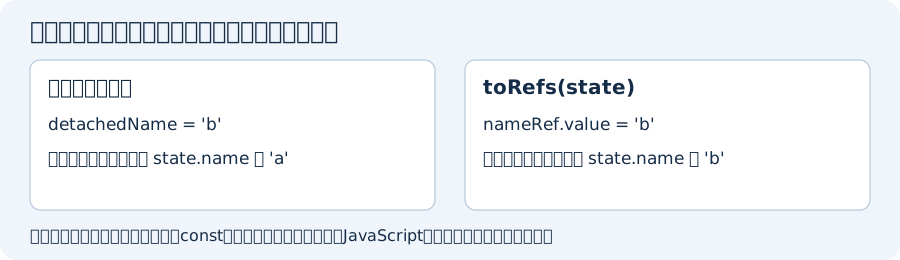
constへの再代入や同名変数の重複宣言はJavaScriptのエラーです。reactiveの分割代入による連動の喪失とは分けて確認します。以下は変数名を分け、各状態をConsoleで比較できる例です。
import { ref, reactive, toRefs } from 'vue';

// ref: JavaScriptでは.valueを読む。
const count = ref(0);
console.log(count + 1); // 誤った読み方。数値の1にはならない。
console.log(count.value + 1); // 1

// 分割代入した文字列は、元のstateと連動しない。
const state = reactive({ name: 'a' });
let { name: detachedName } = state;
detachedName = 'b';
console.log(detachedName, state.name); // b a

// toRefsなら同じプロパティを更新できる。
const { name: nameRef } = toRefs(state);
nameRef.value = 'b';
console.log(state.name); // b

// オブジェクトの再代入は、元のProxyを購読する処理と切り離される。
let s = reactive({ a: 1 });
const originalProxy = s;
s = { a: 2 }; // 失敗例: sは通常のオブジェクトになる。
console.log(s.a, originalProxy.a); // 2 1
originalProxy.a = 2; // 正しい例: 元のProxyのプロパティを更新。

// オブジェクト全体を置き換えたいならrefを使う。
const sref = ref({ a: 1 });
sref.value = { a: 2 };
console.log(sref.value.a); // 2
4. v-model が動かない (カスタムコンポーネント)
Vue 3 の v-model は modelValue + update:modelValue イベント。
親コンポーネント側の呼び出し(textは親で定義):
<!-- 親 -->
<MyInput v-model="text" />
Vue 3の標準v-modelとは合わないvalue/input宣言の例(子の断片):
<script>
export default {
  props: ['value'],
  emits: ['input'],
}
</script>
子MyInput.vueの修正例:
<script setup>
defineProps(['modelValue'])
const emit = defineEmits(['update:modelValue'])
</script>

<template>
  <input :value="modelValue"
         @input="emit('update:modelValue', $event.target.value)" />
</template>
Vue 3.4以降なら上の子コンポーネントの代わりにdefineModelを使えます。2つの実装を同じファイルへ重ねないでください:
<script setup>
const text = defineModel()
</script>
<template>
  <input v-model="text" />
</template>
5. Vue 2 → 3 移行で消えた API
| Vue 2 | Vue 3 での扱い |
|---|---|
Vue.filter('xxx', fn) | 廃止。computed や methods で代替 |
Vue.prototype.$xxx | app.config.globalProperties.$xxx |
$listeners | $attrs に統合 |
@click.native | .nativeは廃止。emitsにないリスナーはルート要素へ渡る。複数ルートやinheritAttrs:falseは明示的な転送が必要 |
:title.sync="pageTitle" | v-model:title="pageTitle"(prop:title、emit:update:title)。複数のv-modelも可能 |
new Vue({...}) | createApp({...}).mount(...) |
| Functional Component | 関数で書くだけ (props 引数) |
Vue.set / Vue.delete | 不要 (Proxy ベースリアクティビティ) |
EventBus (new Vue()) | mitt 等の外部ライブラリ推奨 |
6. Vue Router の動的ルート
// Vue Router 4
import { createRouter, createWebHistory } from 'vue-router'

const router = createRouter({
  history: createWebHistory(),
  routes: [
    { path: '/users/:id', component: UserDetail },
    { path: '/users/:id(\\d+)', component: UserDetail },     // 数値のみ
    { path: '/files/:path(.*)*', component: FileView },      // catch-all
  ],
})

// 動的ルートで同じコンポーネントが再利用される
// → 同じコンポーネントだとライフサイクル発火しない
// 対処: route.params を watch
import { watch } from 'vue'
import { useRoute } from 'vue-router'

const route = useRoute()
watch(() => route.params.id, async (newId) => {
  await loadUser(newId)
}, { immediate: true })

// or :key で強制再生成
// <router-view :key="$route.fullPath" />
7. Pinia (推奨ストア)
ストアのファイル:
// store/counter.js
import { defineStore } from 'pinia'
import { ref, computed } from 'vue'

export const useCounterStore = defineStore('counter', () => {
  const count = ref(0)
  const double = computed(() => count.value * 2)
  function increment() {
    count.value++
  }
  return { count, double, increment }
})
コンポーネント側のscript setup(別ファイルの断片):
<script setup>
import { useCounterStore } from '@/store/counter'
import { storeToRefs } from 'pinia'

const store = useCounterStore()
const { count, double } = storeToRefs(store)   // リアクティブ維持
const { increment } = store                    // 関数は分割代入 OK
</script>
8. Production 警告を抑制
// main.js
import { createApp } from 'vue'
import App from './App.vue'

const app = createApp(App)

// warnHandlerは開発用。原因調査を終える前に警告を消さない。
app.config.warnHandler = (msg, instance, trace) => {
  console.warn(msg, trace)
}

// 本番では Vue 自体が警告を出さない (vue.runtime.prod.js)
app.mount('#app')
9. Vue DevTools 利用
- Chrome 拡張 / Firefox アドオン: 「Vue.js devtools」
- スタンドアロン版:
npm i -g @vue/devtools→vue-devtools起動 - コンポーネントツリー / Pinia ストア / イベント / Performance を可視化
- 本番ビルドでは無効化される。デバッグしたい場合は
__VUE_PROD_DEVTOOLS__ = true
10. Nuxt の Hydration mismatch
[Vue warn]: Hydration node mismatch:
- Client vnode: <div>...
- Server rendered DOM: <span>...
Hydration completed but contains mismatches.
原因: SSR と CSR で生成される DOM が異なる (時刻、Math.random、window 参照など)。
<!-- ❌ サーバとクライアントで違う値 -->
<div>{{ new Date().toLocaleString() }}</div>

<!-- ❌ window はサーバに無い -->
<div>{{ window.innerWidth }}</div>

<!-- ✅ ClientOnly で囲む (Nuxt) -->
<ClientOnly>
  <div>{{ new Date().toLocaleString() }}</div>
</ClientOnly>

<!-- ✅ onMounted で window を扱う -->
<script setup>
import { ref, onMounted } from 'vue'
const width = ref(0)
onMounted(() => { width.value = window.innerWidth })
</script>

<!-- ✅ useState / useFetch でサーバ側で確定させてから渡す -->
<script setup>
const { data } = await useFetch('/api/now')   // SSR で確定
</script>
FAQ
Q: watch が発火しない
A: ref なら watch(myRef, ...)、reactive 内プロパティは watch(() => state.x, ...) のように関数で。
Q: コンポーネントが再描画されない
A: リアクティビティ切断 (分割代入、再代入)。toRefs や ref 化で解決。
Q: provide / inject がアプリ全体で動かない
A: app.provide(key, value) をルートで設定。コンポーネント内 provide はサブツリーのみ有効。
Q: TypeScript で props の型が効かない
A: defineProps<{ id: number }>() でジェネリック指定。または defineProps({ id: { type: Number, required: true } })。
エラーを調べる順番
- 最初のConsoleエラーを読み、構文エラー・Vueの警告・通信エラーを分けます。
- 失敗例と修正例を混ぜず、1ファイルへ入れるコードを確認します。
- データ取得前のnull、空配列、取得後の値を別々に確認します。
- refなら.value、reactiveなら元のProxyのプロパティが更新されたかを確認します。
- Vue 2とVue 3のprops・emit・ルーターの対象版を確認します。
参照: Vueのリアクティビティ、v-modelと.syncの移行、.native廃止とemits(2026年10月確認)。
- インストール(ファイルのダウンロード)
- npmを使用したプロジェクトの作成
- for 繰り返し処理
- ifの条件分岐とtemplateを用いたグループ化
- クリック時のイベント処理(on:click)
- modelとdata フォーム入力値とDOMへの即時反映
- computed(算出プロパティ)と使い方とdataとの違い
- ライフサイクルフック(created / mounted / updated / destroyedの使い方)
- $nextTickの使い方(ライフサイクルフック)
- メソッドの定義方法
- エラー一覧
- ルーティング設定
- aリンクの貼り方と動的URLの作成
- Mixinを利用した共通処理の記述方法
- v-bindによるデータ連携
- ヘッダー/フッターの共通コンポーネント
- ナビゲーションの現在ページをハイライトする方法
- 画面サイズの取得方法
人気ページ
- 1 Eclipseで「サーバーに追加または除去できるリソースがありません。」の原因と対処法
- 2 tomcat の起動 / 停止ログと catalina.log・catalina.out の違い
- 3 JavaScript で base URL を取得する方法|window.location.origin
- 4 YouTube Data API v3 エラー一覧|403・400・404 の原因と対処
- 5 Laravel エラー一覧|500/Blade/DB 接続/ルーティングの代表エラー
- 6 3Dグラフィックスとは|モデリング/レンダリング/主要ソフトウェア (Blender / Maya)
- 7 Spring Frameworkのアノテーション一覧
- 8 【Spring】@Valueアノテーションとは
- 9 CATALINA_HOME の確認方法 (Linux / Mac)
- 10 【Spring】@Autowiredアノテーションとは
最近更新/作成されたページ
- プロジェクトをTomcatプロジェクトとして認識させる方法 2026-10-07 22:32:50
- MySQLの1366 Incorrect string value|Laravelの文字コード・絵文字エラー 2026-10-07 21:54:03
- curlの証明書ホスト名不一致|旧エラー51・現行60の確認と対処 2026-10-07 21:54:03
- LaravelのMassAssignmentException|fillableの原因と安全な対処 2026-10-07 21:54:03
- Eclipse で Tomcat の起動ログがコンソールに出ない時の確認手順 2026-10-07 21:54:02
- MySQLにおける中央値(Median)の導き方(バージョン8未満) 2026-10-07 13:49:45
- getInputForward 2026-10-07 13:41:15
- JSONから配列に変換 2026-10-07 13:41:15
- ビューから値をモデルに格納しコントローラーで受け取る方法 2026-10-07 13:23:41
- Laravelのテーブル作成と定義変更|マイグレーション・up/down・注意点 2026-10-07 13:23:41
- NumPy 配列に要素を追加する方法 (append / concatenate) 2026-10-07 13:23:41
- MariaDB・MySQLで現在日時を取得する方法|NOW・タイムゾーン・保存型 2026-10-07 13:13:36
- 【django】テンプレートで定数を使用する方法 2026-10-07 13:10:15
- Spring BootにおけるApplication.propertiesの環境依存設定の分割方法 2026-10-07 12:09:35
- Not supported for DML operations【Springエラー】 2026-10-07 11:09:38