| この記事の要点 |
|---|
|
エラー内容
|
Caused by: java.lang.RuntimeException: org.hibernate.hql.internal.QueryExecutionRequestException: Not supported for DML operations [UPDATE ... ]; nested exception is java.lang.IllegalStateException: org.hibernate.hql.internal.QueryExecutionRequestException: Not supported for DML operations [UPDATE ... ] |
発生条件/原因/対処法
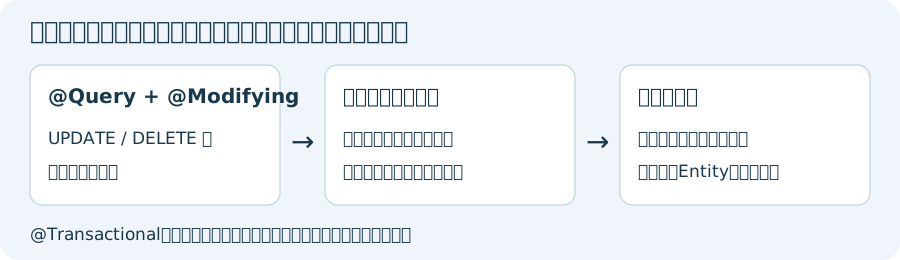
JPAで更新系のSQLを実行した際に発生するエラー。
掲載例外は、更新クエリを検索用APIで実行した場合のエラーです。今回、Hibernate 5.6.15.FinalとSpring Data JPA 2.7.18で、@Transactionalだけの@Queryを呼ぶと同じNot supported for DML operationsを再現しました。トランザクション不足とは区別します。@Modifyingだけでトランザクション外から呼んだ場合は、この検証ではTransactionRequiredExceptionでした。
Spring Data JPAの@QueryにUPDATE / DELETEを定義するときは、以下のように@Modifyingを付けて更新として実行します。さらに実際の呼出しが書込み可能なトランザクション内になる必要があります。アノテーションを付けるだけで、設定・呼出し方に関係なく必ずトランザクションが始まるという意味ではありません。
|
@Repository |
二つの設定の役割
| 設定 | 役割と確認 |
|---|---|
| @Modifying | @Queryの更新クエリをexecuteUpdateで実行する。トランザクションを作る設定ではない |
| @Transactional | Springが管理する呼出しのトランザクション境界。クエリを検索から更新へ切り替える設定ではない |
| 外側のサービスのトランザクション | 業務処理全体の境界。既存のreadOnlyや伝播設定を確認する |
派生したdeleteByメソッドや独自実装の全メソッドへ無条件に@Modifyingを付けるものではありません。EntityManagerを直接使うなら、更新クエリをgetResultList / getSingleResultではなくexecuteUpdateで実行するか確認します。
ファイル単位の検証例
以下は旧APIのjavax.persistenceを使うHibernate 5.6 / Spring Data JPA 2.7向けです。現行のjakarta.persistenceを使う構成へ古い依存JARを導入する例ではありません。TestEntity.javaとTestRepository.javaは別ファイルで、既存のSpring/JPA設定とRepositoryスキャンが必要です。
example/TestEntity.java
package example;

import javax.persistence.Entity;
import javax.persistence.Id;
import javax.persistence.Table;

@Entity
@Table(name = "test_entity")
public class TestEntity {
    @Id
    private String id;
    private int colA;

    protected TestEntity() {}
    public TestEntity(String id, int colA) { this.id = id; this.colA = colA; }
    public String getId() { return id; }
    public int getColA() { return colA; }
}
example/TestRepository.java
package example;

import org.springframework.data.jpa.repository.JpaRepository;
import org.springframework.data.jpa.repository.Modifying;
import org.springframework.data.jpa.repository.Query;
import org.springframework.data.repository.query.Param;
import org.springframework.transaction.annotation.Transactional;

public interface TestRepository extends JpaRepository<TestEntity, String> {
    @Transactional
    @Modifying
    @Query("UPDATE TestEntity te SET te.colA = 1 WHERE te.id = :id")
    int updateTest(@Param("id") String id);
}
JPQLのTestEntityとcolAはEntity名・Java属性名です。テーブル名test_entityやDBカラム名をそのまま書くSQLではありません。nativeQuery=trueでネイティブSQLを使う場合とは区別してください。元のInteger戻り値も更新件数を表せます。上の例ではintを使い、存在するidで1、存在しないidで0になることを確認しました。0は例外ではなく、条件に該当する行がないなどの結果として調べます。
更新後の値が古く見える場合
一括更新は既に保持しているEntityの値を自動で書き換えるとは限りません。この検証では更新件数1でも保持中のcolAは0のままで、永続化コンテキストをclearして再取得すると1になりました。DB更新失敗と決めつけず、保持中のEntityと再取得した結果を区別します。
clearAutomatically=trueを使う場合、未flushの変更を失うおそれがあります。flushAutomatically=trueも含め、他の変更・サービスのトランザクション全体への影響を検証し、症状だけを隠すために一律付与しないでください。
確認手順
- Spring Data JPA・Hibernate・SpringとJPA APIの版、例外の最も内側の原因を記録する。
- @Queryの文がSELECTかUPDATE / DELETEか、Modifyingのimportがorg.springframework.data.jpa.repository.Modifyingか確認する。
- 実際に呼ぶBean、トランザクション管理、外側のreadOnly設定を確認する。自己呼出しなど、Springのプロキシを通らない呼出しにも注意する。
- 隔離した検証DBで対象あり/なしの更新件数と、コミット後に再取得した値を確認する。
今回はH2のメモリDBと実際のSpring Repositoryプロキシで5テストを実行しました。旧例外の再現、トランザクション不足との区別、更新とコミット、対象なし、保持中Entityの古い値を確認しています。本番DB・実システム全体・別Hibernate版で同じ例外文になることは検証していません。
公式資料: Spring Data JPAの更新クエリ、トランザクション、Hibernate 5.6.15の検索/更新の実装(2026年10月確認)。
子ページはありません
- java.lang.IllegalStateException: CGLIB is required to process @Configuration classes
- Error creating bean with name 'org.springframework.aop.config.internalAutoProxyCreator': Instantiation of bean failed; nested exception is java.lang.NoClassDefFoundError: Could not initialize class org.springframework.aop.aspectj.annotation.AnnotationAwareAspectJAutoProxyCreator
- No mapping found for HTTP request with URI ... in DispatcherServlet with name ...
- An internal error occurred during: "Building UI model". com/google/common/base/Function
- No identifier specified for entity : ...
- org.hibernate.hql.internal.ast.QuerySyntaxException: table_name is not mapped
- No compiler is provided in this environment
- java.sql.SQLException: The server time zone value ' ... ' is unrecognized or represents more than one time zone. You must configure either the server or JDBC driver (via the serverTimezone configuration property) to use a more specifc time zone value if you want to utilize time zone
- Caused by: java.lang.RuntimeException: Executing an update/delete query
- Not supported for DML operations
- Field ... required a bean of type ... that could not be found.
- Annotation-specified bean name 'xxxController' for bean class [com.xxx.controller.xxxController] conflicts with existing, non-compatible bean definition of same name and class [com.xxx.xxxController]
- Whitelabel Error Page This application has no explicit mapping for /error, so you are seeing this as a fallback.
- Exception in thread "main" java.lang.UnsupportedClassVersionError
人気ページ
- 1 Eclipseで「サーバーに追加または除去できるリソースがありません。」の原因と対処法
- 2 tomcat の起動 / 停止ログと catalina.log・catalina.out の違い
- 3 JavaScript で base URL を取得する方法|window.location.origin
- 4 YouTube Data API v3 エラー一覧|403・400・404 の原因と対処
- 5 Laravel エラー一覧|500/Blade/DB 接続/ルーティングの代表エラー
- 6 3Dグラフィックスとは|モデリング/レンダリング/主要ソフトウェア (Blender / Maya)
- 7 Spring Frameworkのアノテーション一覧
- 8 【Spring】@Valueアノテーションとは
- 9 CATALINA_HOME の確認方法 (Linux / Mac)
- 10 【Spring】@Autowiredアノテーションとは
最近更新/作成されたページ
- プロジェクトをTomcatプロジェクトとして認識させる方法 2026-10-07 22:32:50
- MySQLの1366 Incorrect string value|Laravelの文字コード・絵文字エラー 2026-10-07 21:54:03
- curlの証明書ホスト名不一致|旧エラー51・現行60の確認と対処 2026-10-07 21:54:03
- LaravelのMassAssignmentException|fillableの原因と安全な対処 2026-10-07 21:54:03
- Eclipse で Tomcat の起動ログがコンソールに出ない時の確認手順 2026-10-07 21:54:02
- MySQLにおける中央値(Median)の導き方(バージョン8未満) 2026-10-07 13:49:45
- getInputForward 2026-10-07 13:41:15
- JSONから配列に変換 2026-10-07 13:41:15
- ビューから値をモデルに格納しコントローラーで受け取る方法 2026-10-07 13:23:41
- Laravelのテーブル作成と定義変更|マイグレーション・up/down・注意点 2026-10-07 13:23:41
- NumPy 配列に要素を追加する方法 (append / concatenate) 2026-10-07 13:23:41
- MariaDB・MySQLで現在日時を取得する方法|NOW・タイムゾーン・保存型 2026-10-07 13:13:36
- 【django】テンプレートで定数を使用する方法 2026-10-07 13:10:15
- Spring BootにおけるApplication.propertiesの環境依存設定の分割方法 2026-10-07 12:09:35
- Not supported for DML operations【Springエラー】 2026-10-07 11:09:38