| この記事の要点 |
|---|
|
Struts 1 の ActionMapping#getInputForward() についての記事です。struts-config.xml の <action> タグで指定した input 属性の遷移先を、ActionForward として取得します。入力エラー時に元のフォーム画面へ戻すときに使う代表的なメソッドです。
定義
Struts 1は保守終了済みです。この記事は既存システムの読解・保守向けで、新規導入の推奨ではありません。以下の条件はStruts 1.3.10の公開ソースと実体で照合しました。
| 修飾子と型 | メソッドと説明 |
|---|---|
| public ActionForward | getInputForward() 「struts-config.xml」の<action>内のinputとcontrollerのinputForward設定から戻り先のActionForwardを取得します。メソッド自体は画面遷移しません。 |
一般的な使い方
元のexecute例は処理の断片です。validateInput(form)はアプリ独自の検証メソッドを想定しており、Strutsの組み込みメソッドではありません。Actionクラス・検証処理・フォーム・JSPは別途必要です。
フォームのバリデーションが失敗したとき、入力画面に戻すために execute() 内から呼びます。
|
public ActionForward execute( |
struts-config.xml 側の設定
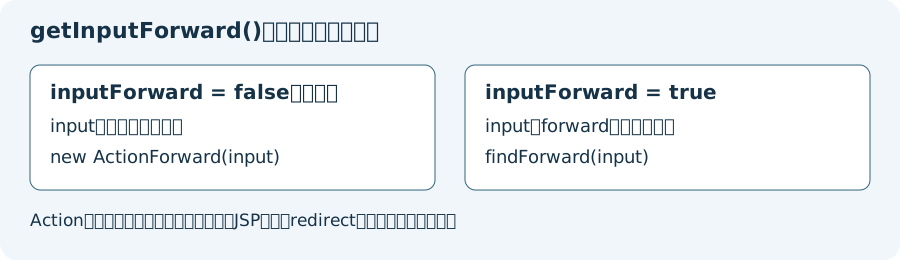
以下の元の設定例はcontrollerのinputForward=false(既定値)を前提とします。このモードではinputをパスとしてActionForwardを生成します。inputForward=trueにするとinputをforward名として検索するため、同じ設定の意味にはなりません。
|
<action path="/userRegister" |
inputForward=falseの場合、getInputForward() は /user/registerForm.jsp を指す ActionForward を返します。
findForward との違い
| メソッド | 遷移先の決め方 | 主な用途 |
|---|---|---|
getInputForward() | <action> の input 属性 | 入力エラー時に元の入力画面に戻る |
findForward("name") | <forward name="..."/> の path | 正常処理後の遷移、複数パターンの分岐 |
注意点
- input未指定の戻り値はモードで異なります。inputForward=falseではパスがnullのActionForwardが生成され、オブジェクト自体はnullではありません。trueでは名前解決に失敗するとnullが返ります。どちらも有効な画面へ戻れる設定とはいえません。
- 自動入力検証 (
validate="true") を使う場合、エラー時には Struts が自動でinput先へ戻すため、getInputForward()を明示的に呼ぶ必要はない - Struts 1 系は 2013 年に EOL。新規開発では Spring MVC 等が選択肢
inputForward設定別の戻り値
| controller設定 | inputの意味 | 戻り値 |
|---|---|---|
| false(既定) | /user/registerForm.jspなどのパス | そのパスで新しいActionForwardを生成。redirectはfalse |
| true | inputFormなどのforward名 | findForward(input)の検索結果。設定済みredirect等も引き継ぐ |
| false、input未指定 | null | ActionForwardは非null、getPath()はnull |
| true、名前が未登録 | 解決できない名前 | null |
findForwardはAction内のローカルforwardを先に調べ、なければモジュールのglobal-forwardを調べます。同名ならローカルが優先されます。上の比較表のgetInputForwardも、trueモードではこの名前検索を利用する点に注意してください。
名前で入力画面を指定する設定例
既存のstruts-configへ差し込む設定断片です。controllerは同じモジュールの既存設定を確認し、重複追加やファイル全体の上書きをしないでください。フォーム定義やActionクラスは省略しています。
<action path="/userRegister" type="com.example.UserRegisterAction"
        name="userForm" scope="request" input="inputForm">
    <forward name="inputForm" path="/user/registerForm.jsp" redirect="false"/>
    <forward name="success" path="/user/registerSuccess.jsp"/>
</action>
<!-- Existing controller settings must be retained. -->
<controller inputForward="true"/>
inputの値はパスでなくinputFormです。redirect=trueのforwardを選ぶと後続処理の挙動も変わり、request属性の入力エラーなどを次のリクエストへそのまま渡せません。画面へ戻す際のscopeとエラー表示の設計も確認します。
戻り値だけを確認する独立したJava例
次はInputForwardExample.javaです。Struts 1.3.10 / Java 21でModuleConfigとControllerConfigを明示して実行しました。既存アプリの設定を読み込む例ではなく、2モードと未指定時の戻り値を切り分ける例です。
package example;

import org.apache.struts.action.ActionForward;
import org.apache.struts.action.ActionMapping;
import org.apache.struts.config.ControllerConfig;
import org.apache.struts.config.impl.ModuleConfigImpl;

public class InputForwardExample {
    public static ActionMapping mapping(boolean inputForward, String input) {
        ModuleConfigImpl module = new ModuleConfigImpl("");
        ControllerConfig controller = new ControllerConfig();
        controller.setInputForward(inputForward);
        module.setControllerConfig(controller);
        ActionMapping mapping = new ActionMapping();
        mapping.setModuleConfig(module);
        mapping.setInput(input);
        return mapping;
    }

    public static void main(String[] args) {
        ActionMapping path = mapping(false, "/user/registerForm.jsp");
        System.out.println("path=" + path.getInputForward().getPath());

        ActionMapping named = mapping(true, "inputForm");
        named.addForwardConfig(new ActionForward("inputForm", "/user/registerForm.jsp", false));
        System.out.println("named=" + named.getInputForward().getPath());

        ActionMapping missing = mapping(false, null);
        System.out.println("missingPath=" + missing.getInputForward().getPath());
    }
}
出力
path=/user/registerForm.jsp
named=/user/registerForm.jsp
missingPath=null
単独でnew ActionMapping()だけを生成すると、モジュール設定がなくgetInputForward()でNullPointerExceptionになる条件も確認しました。これは独立テストの設定不足で、通常の本番例外をこの原因と断定する説明ではありません。
入力画面へ戻らないときの確認順
- 対象モジュールのcontroller.inputForwardがfalseかtrueかを確認する。
- falseならinputのパス、trueならinputとforwardの名前の一致を確認する。
- 戻り値がnullか、getPath()がnullか、redirectがtrueかを別々に確認する。
- 設定を取得できたことと実際のJSP表示を分け、対象リソース・コンテキスト・権限・エラー表示を確認する。
- ActionFormの自動validateとexecute内の独自検証を区別する。前者は設定とRequestProcessorによってexecute前に入力画面へ戻るため、executeへ到達したと決めつけない。
追加8テストでパス/名前モード、未指定、ローカル/グローバルと優先順位、redirect、モジュール未設定、掲載出力を確認しました。Tomcat上のXML読込・Action実行・JSP描画・自動検証を含むアプリ全体は未検証です。
一次資料: Apache公開ActionMapping Javadoc 1.3.10、Apache配布の1.3.10ソース、Struts 1 EOL告知(2026年10月確認)。
子ページはありません
同階層のページはありません
人気ページ
- 1 Eclipseで「サーバーに追加または除去できるリソースがありません。」の原因と対処法
- 2 tomcat の起動 / 停止ログと catalina.log・catalina.out の違い
- 3 JavaScript で base URL を取得する方法|window.location.origin
- 4 YouTube Data API v3 エラー一覧|403・400・404 の原因と対処
- 5 Laravel エラー一覧|500/Blade/DB 接続/ルーティングの代表エラー
- 6 3Dグラフィックスとは|モデリング/レンダリング/主要ソフトウェア (Blender / Maya)
- 7 Spring Frameworkのアノテーション一覧
- 8 【Spring】@Valueアノテーションとは
- 9 CATALINA_HOME の確認方法 (Linux / Mac)
- 10 【Spring】@Autowiredアノテーションとは
最近更新/作成されたページ
- Git pushした変更の取消し|revert・履歴変更と保護の注意点 2026-10-15 23:49:01
- Gitでローカルを戻す前に|reset・restoreの違いと退避範囲 2026-10-15 23:49:01
- Git rebaseの使い方|対象範囲・競合解決・pushの判断 2026-10-15 22:50:59
- Git pullの使い方|取込み先・ff-only・競合とstashの注意点 2026-10-15 22:50:59
- Git pushの使い方|送信先・タグ・force-with-leaseの条件 2026-10-15 22:12:47
- Git remoteの設定・確認・削除|SSH URLとfetch/pushの違い 2026-10-15 22:12:47
- Gitリモートリポジトリの作成|初回push・既存履歴・mirrorの注意 2026-10-15 15:48:16
- Gitのuser.name・user.email設定|local/global・確認と過去履歴の注意 2026-10-15 15:30:07
- LinuxにGitをインストール|配布元・初期設定・TLSと認証の確認 2026-10-15 15:30:06
- Git導入と初回push|Linuxサーバー・Windows/macOS・SSH設定 2026-10-15 14:51:54
- Db2のCREATE INDEX|索引定義・INCLUDEと実行計画の確認 2026-10-15 14:10:22
- Db2の自動採番|IDENTITY・ID取得とRESTARTの注意点 2026-10-15 14:10:22
- 【DB2】特定スキーマの全テーブルの全カラム情報を取得する方法 2026-10-15 13:53:15
- Db2のシーケンスとIDENTITYの違い|採番とカタログの確認SQL 2026-10-15 13:53:15
- Db2で複数カラムをUPDATEする方法|SET・WHEREと更新前の値 2026-10-15 13:53:15